Faster response without rushing
Acknowledgements, routing and reminders happen consistently, so the team can spend its time on the conversation that follows.
Business automation
We map the repetitive work around leads, customers, reporting and internal operations, then automate the parts that are predictable and safe to delegate to software. The result is not a box of disconnected recipes: it is a joined-up workflow with clear ownership, useful alerts and people kept in the loop where judgement matters.
The cost of manual work
Manual work is not only slow. It makes follow-up inconsistent, data difficult to trust and important context hard to find. Automation should remove avoidable handling without pretending that every customer, lead or operational decision is the same.
Website forms, inboxes, social messages and spreadsheets make it easy to miss a promising enquiry or respond twice.
A busy team intends to reply, then the next urgent task takes over and the lead goes quiet.
People retype contact details, copy notes between systems and postpone updates until the information is no longer fresh.
Someone spends part of every week exporting, cleaning and reconciling data before anyone can discuss what it means.
Tasks move between people with a partial brief, so staff repeat questions and customers repeat their story.
Teams either receive every event or discover an important exception after the useful moment has passed.
Data entry, document creation, status changes and reminders take time away from service and improvement.
Generative tools can assist with drafting and sorting, but sensitive judgement, approval and accountability still need a person.
What we automate
We do not automate for its own sake. We document the current process, remove unnecessary steps, connect the right systems and put a review point around anything that needs judgement. Each workflow has a trigger, a defined action, an owner and a safe failure path.
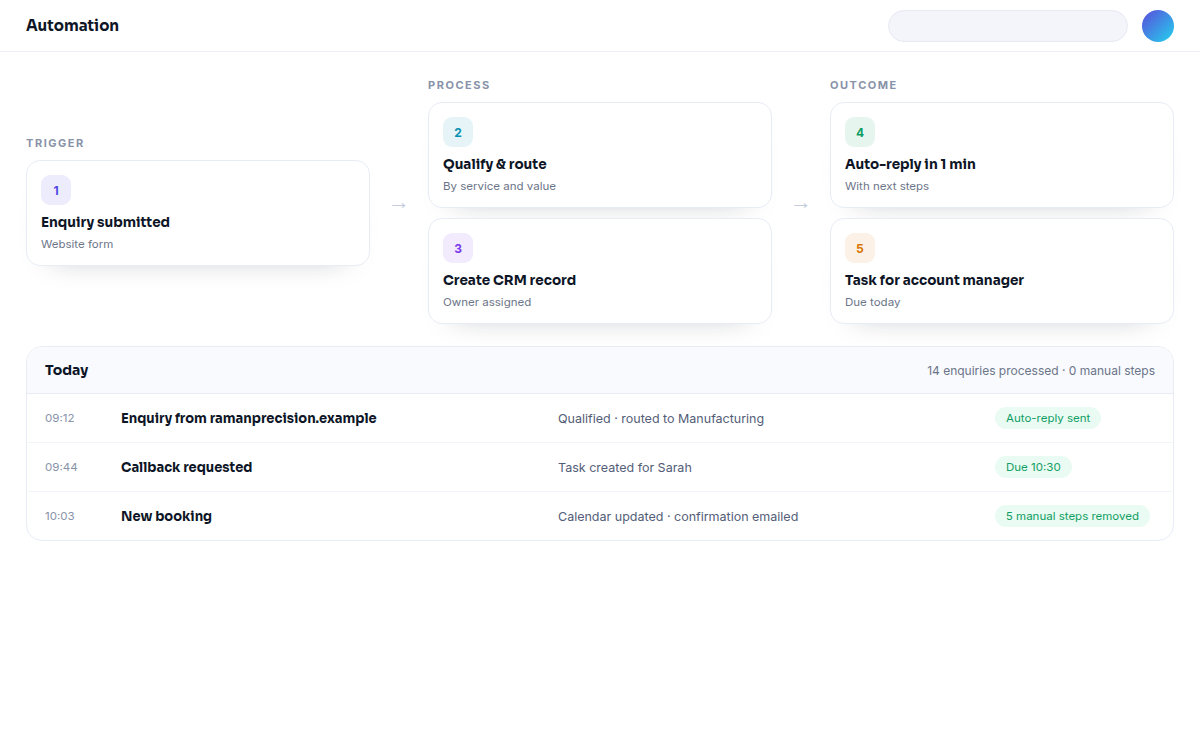
Collect enquiries consistently, validate the useful fields, create or update the CRM record and route the lead to the right person or queue.
Send acknowledgement, reminders and task prompts based on the lead stage, response and agreed service process rather than a generic blast.
Prepare appointment reminders, service updates, onboarding messages and handover notes while leaving relationship-sensitive replies with your team.
Keep statuses, owners, activities and next actions aligned across the systems your people use, with duplicate and exception handling considered.
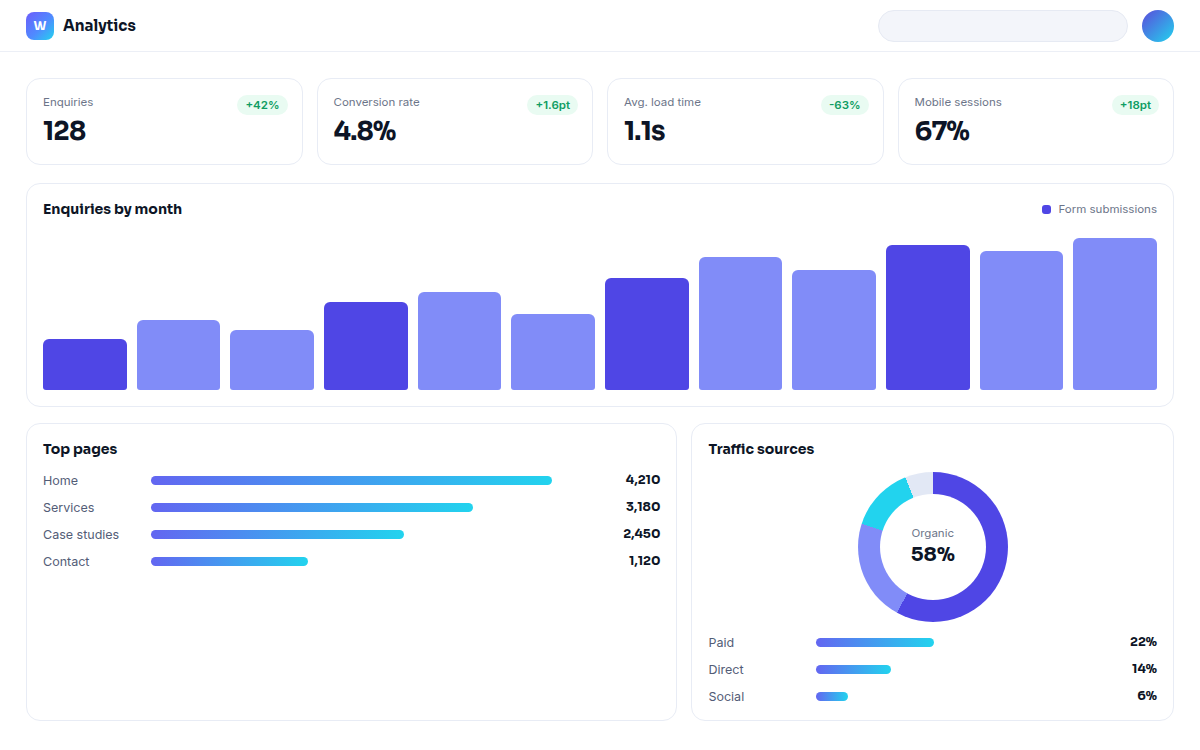
Bring approved data into repeatable reports or dashboards so leaders can review pipeline, activity and operational signals without rebuilding the spreadsheet.
Alert the right person when a task is overdue, a high-value event occurs or an integration fails; do not turn every system event into noise.
Create records, copy approved fields, generate routine documents and move work between stages when the rules are clear and repeatable.
Use AI to classify, summarise, extract and draft where the input is suitable, with prompts, permissions and a human approval step designed into the process.
Document what runs, who owns it, what happens when data is missing and how changes are tested before a workflow is trusted with live work.
Workflow in context
A useful workflow shows its trigger, actions, owner and exception path. Seeing that sequence makes it easier to decide what software should handle and where a person still needs to review.
What the work is designed to achieve
The aim is not to remove people from the process. It is to give them cleaner information, fewer avoidable tasks and a clear point at which their experience and judgement improve the outcome.
Acknowledgements, routing and reminders happen consistently, so the team can spend its time on the conversation that follows.
Records are updated at the point of work, giving people a more dependable view of status, ownership and next action.
Repeatable inputs and definitions make reports easier to review and less dependent on one person’s spreadsheet.
Documented triggers, owners and exception paths make the workflow easier to train, improve and hand over.
Automation handles predictable work while approvals, advice, sensitive communication and unusual cases stay accountable.
How the project runs
We begin with one real workflow rather than a wish list of tools. You can see what changes, what remains manual and how the automation will be monitored before it is extended to more of the business.
We start with your business, not your pixels. What the website is supposed to do, who it serves and where it currently loses people.
A structured review of design, UX, performance, technical SEO, content and conversion paths — with findings ranked by business impact.
A clear roadmap for the upgraded website: structure, priorities, technology, content plan and what happens in which order.
The new visual experience — page by page, device by device, built as a reusable design system rather than one-off screens.
Clean, standards-based build with the integrations, CMS and automation your team needs to run the site confidently.
Speed, Core Web Vitals, technical SEO, accessibility, mobile experience and conversion paths — measured and refined.
A controlled deployment, tracking in place, and a growth plan for what comes after go-live.
Automation questions
Good automation is specific, observable and reversible. These are the questions we use to separate a useful workflow from an impressive-looking source of new problems.
Choose a process with a clear trigger, repeatable rules and a visible cost when it is delayed or missed. Lead capture and routing, appointment reminders, CRM updates and routine reporting are often useful starting points because the before and after can be observed without changing the whole business at once.
We start with the tools you already rely on and check their APIs, webhooks, permissions, data quality and rate limits. Where a direct connection is not sensible, we will explain the trade-off rather than quietly introduce another system that creates more admin.
Only where the message is predictable, appropriate and agreed. Transactional confirmations and reminders may be safe to send automatically, while advice, complaints, sensitive situations and unusual requests should be routed to a person or held for approval.
AI can assist with tasks such as summarising a call, classifying an enquiry, extracting fields or drafting a response. We define permitted input, limit access, show output to an owner and record when a person must check or correct it; it is not a substitute for accountability.
A production workflow needs an exception path. We design retries, alerts, fallback tasks and ownership for failures, and test incomplete records so a quiet integration error does not become a lost lead or an incorrect customer update.
Every workflow should have a named owner, a short explanation, access controls and a change process. We document the trigger, actions, connected systems and review points so your team can understand, pause and improve it rather than depend on a mystery sequence.
Pairs well with
Bring us one process that is slowing the team down. We will map the current steps, identify what can realistically be automated and show where human review should remain before recommending a build.